Automated Options Trading ยท NIFTY ยท BANKNIFTY ยท FINNIFTY ยท Indian Markets

Stop Watching Charts.
Let Option Pilot Trade For You.

A fully autonomous desktop trading assistant powered by a confidence-voting Dynamic Signal Engine. Evaluates 94 technical indicators, enforces 6-layer risk controls, and executes orders through your broker's official API โ€” hands-free, every session.

โœ… SEBI 2025 Low-Frequency Tier ๐Ÿ”’ 100% Local โ€” Zero Cloud ๐Ÿ“„ Paper Mode Free Forever โšก Zero Coding Required
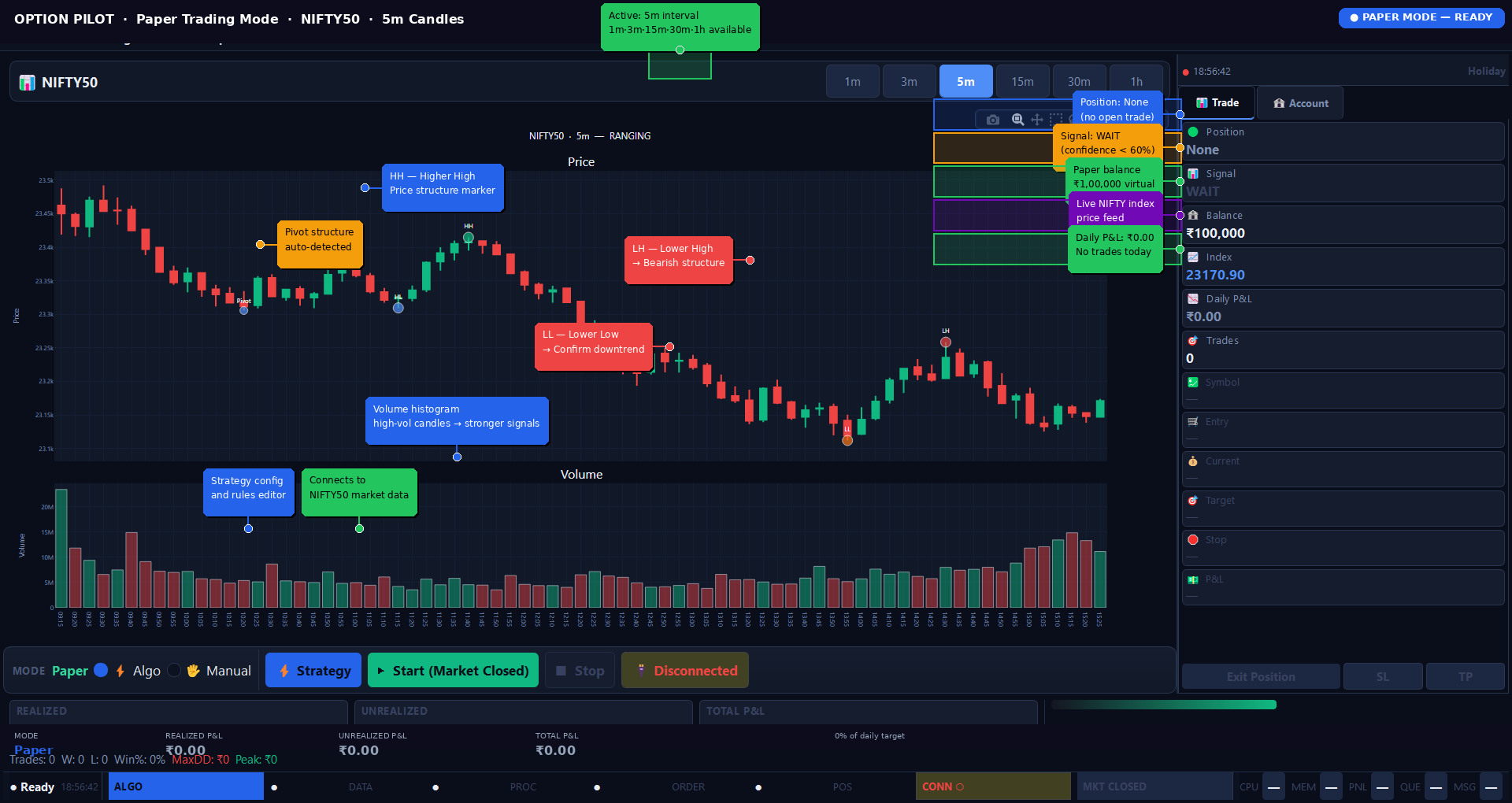
Option Pilot v1.0 โ€” Paper Mode ยท NIFTY50 ยท 5m ยท Dynamic Signal Engine v2.9 ยท Ready
Option Pilot live trading dashboard โ€” NIFTY50 Paper Mode with โ‚น0 P&L, ready state
94+
Technical Indicators
8
Brokers Supported
3
Trading Modes
SEBI
2025 Compliant
7 Days
Free Trial
Connects via official broker SDK โ€” no new account, no intermediary
Fyers
Zerodha
Dhan
Angel One
Upstox
Shoonya
AliceBlue
Flattrade
+ more coming
Dynamic Signal Engine v2.9

94 Indicators. Confidence Voting.
6 Signal Types.

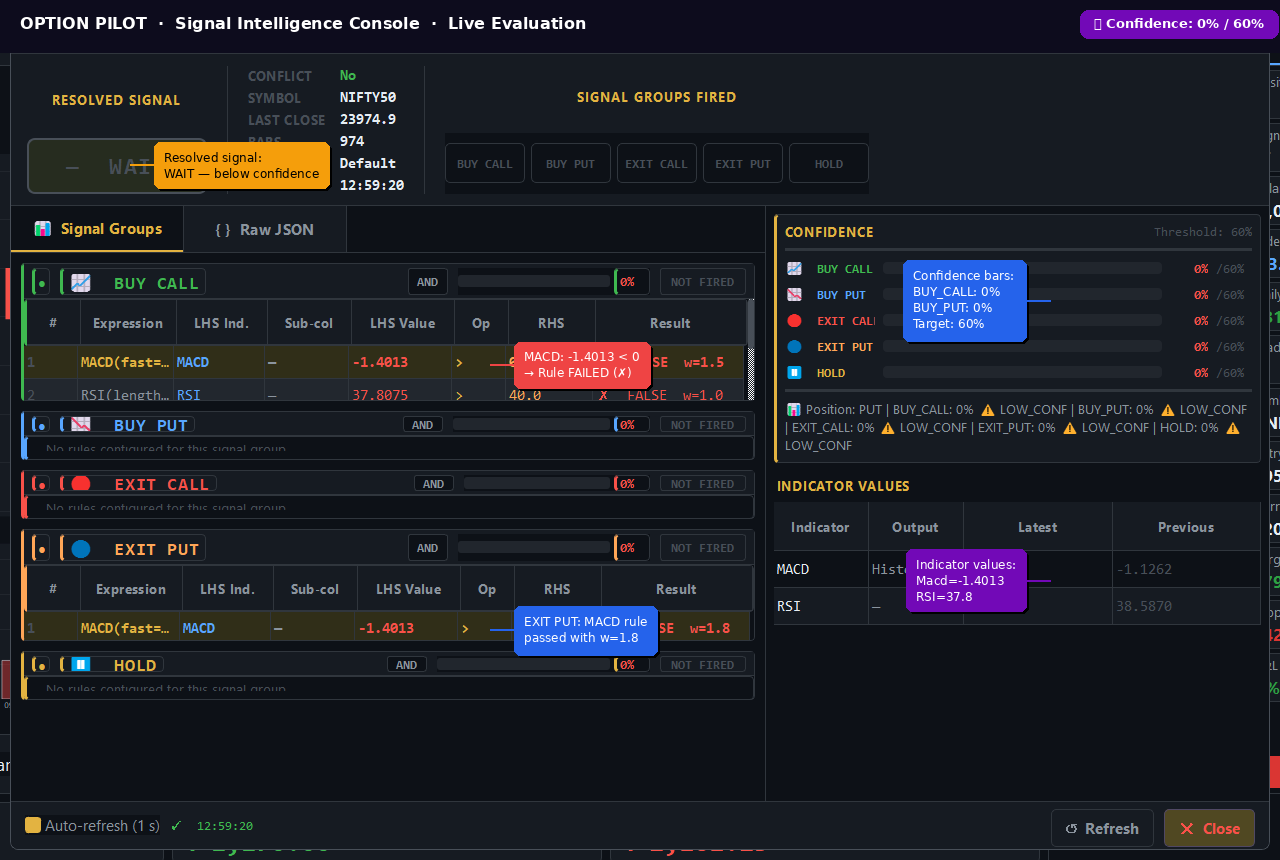
The heart of Option Pilot is the Dynamic Signal Engine v2.9 โ€” a rule-based confidence-voting system that evaluates every configured indicator rule on each candle close and resolves one final signal from five groups.

๐Ÿ”ด Momentum 15 indicators

RSI, MACD, Stoch, CCI, TSI, UO, AO, KAMA, ROC, RVI, TRIX, WillR, DM, PSL, StochRSI

๐Ÿ”ต Trend 26 indicators

EMA, SMA, WMA, HMA, DEMA, TEMA, ADX, Aroon, AMAT, SuperTrend, PSAR, CHOP, CKSP, VHF, Vortexโ€ฆ

๐ŸŸก Volatility 8 indicators

BBands, Keltner Channel, ATR, NATR, Donchian, HWC, True Range, Mass Index

๐ŸŸข Volume 14 indicators

OBV, CMF, MFI, AD, ADOSC, EFI, EOM, KVO, NVI, PVI, PVOL, PVR, PVT, VP

๐ŸŸฃ Statistic 10 indicators

ZScore, Entropy, Kurtosis, MAD, Median, Quantile, Skew, StDev, Variance, TOS_StDevAll

โšช Others 21 indicators

Fisher, HA, LinReg, PPO, Slope, Squeeze, HWMa, Log Return, MCGD, CrossOver, XSignalsโ€ฆ

  • Confidence voting: each rule carries a configurable weight (e.g. ADX=2.0, Supertrend=2.0, MACD=1.8). Signal fires only when ฮฃ(passed) / ฮฃ(total) โ‰ฅ min_confidence (default 60%)
  • 6 signal types: BUY_CALL, BUY_PUT, EXIT_CALL, EXIT_PUT, HOLD, WAIT โ€” each evaluated independently
  • Day-gap protection: prevents false indicator crossovers across trading day boundaries
  • Candle-close caching: results keyed by (symbol, timeframe, df_fingerprint) โ€” zero redundant recalculations per tick
Full Feature Details
Signal Intelligence Console โ€” NIFTY50 ยท MACD + RSI rules ยท Confidence vs. 60% threshold
Signal Intelligence Console showing live rule evaluation with confidence scoring
Strategy Editor v2.0

Visual Rule Builder.
No Python. No Code. Ever.

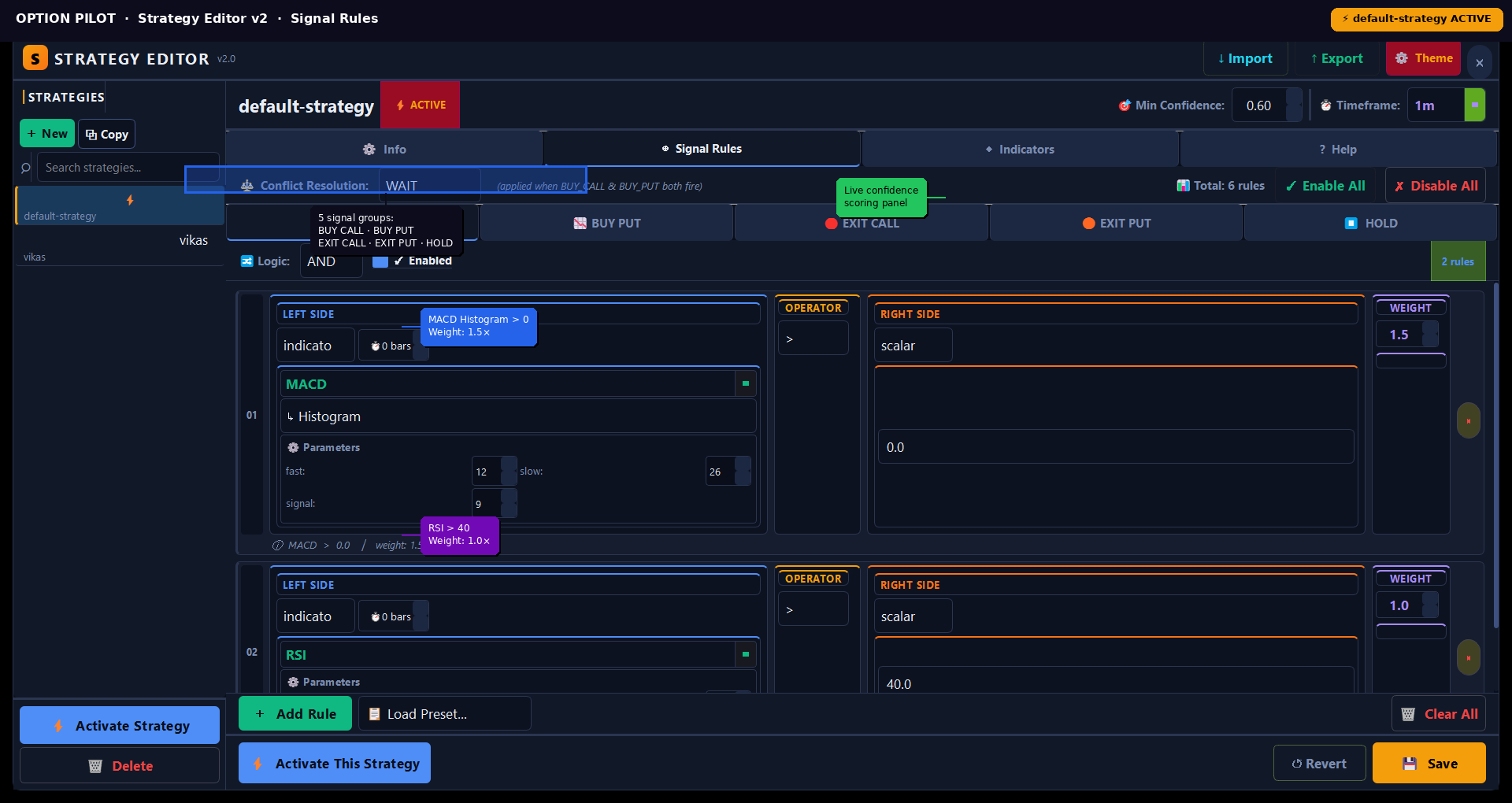
Build and manage multiple named strategies from the Strategy Editor v2.0. Each strategy contains up to 5 signal groups with independent AND/OR logic, per-rule weights, and a configurable confidence threshold.

  • 5 signal groups per strategy: BUY_CALL, BUY_PUT, EXIT_CALL, EXIT_PUT, HOLD โ€” each independently enabled/disabled
  • Per-group logic: AND (all rules must pass) or OR (any rule passes) โ€” configurable per group
  • Conflict resolution: when BUY_CALL and BUY_PUT both fire simultaneously, apply WAIT strategy
  • Multiple strategies: create, copy, activate, and switch strategies with one click
  • Import / Export: save strategies as JSON and load them on any machine
  • Suggested weights per indicator: ADX/Supertrend (2.0), MACD (1.8), TEMA/Aroon (1.7โ€“1.8), RSI/EMA (1.5), Stoch/BBands (1.2โ€“1.5)
See Strategy Editor
Strategy Editor v2.0 โ€” BUY_CALL group ยท MACD Histogram > 0 (w=1.5) + RSI > 40 (w=1.0)
Strategy Editor showing BUY_CALL rules with MACD and RSI
3-Mode Risk Engine

STOP. TRAILING. FIXED.
6 Independent Safeguards.

The risk engine enforces limits automatically on every trade โ€” no overrides, no exceptions. Choose your exit mode and configure per-session limits that are applied from the moment you press Start.

STOP Mode

Fixed Take Profit % and Stop Loss %. Position closes immediately when either threshold is breached. Defaults: TP 15%, SL 7%.

TRAILING Mode

Dynamic SL that moves up as option price rises. Configure: Activation Threshold % (default 10%), SL-at-Activation % (default 5%), and trailing step. SL never moves down once activated.

FIXED Mode

Stepped profit and loss adjustment. Configurable profit step (default 2.0%) and loss step (default 2.0%). Max profit cap configurable (default 30%).

  • Daily Loss Limit: RiskManager (QObject with pyqtSignal) blocks all new orders when cumulative daily P&L breaches the threshold โ€” automatic kill switch fires
  • Max Trades/Day: hard cap on total trades placed per session โ€” prevents overtrading regardless of signals
  • Daily Target: optional profit target โ€” session stops when cumulative P&L reaches this amount
  • Max Hold Bars: auto-exits any open position held longer than N candle bars
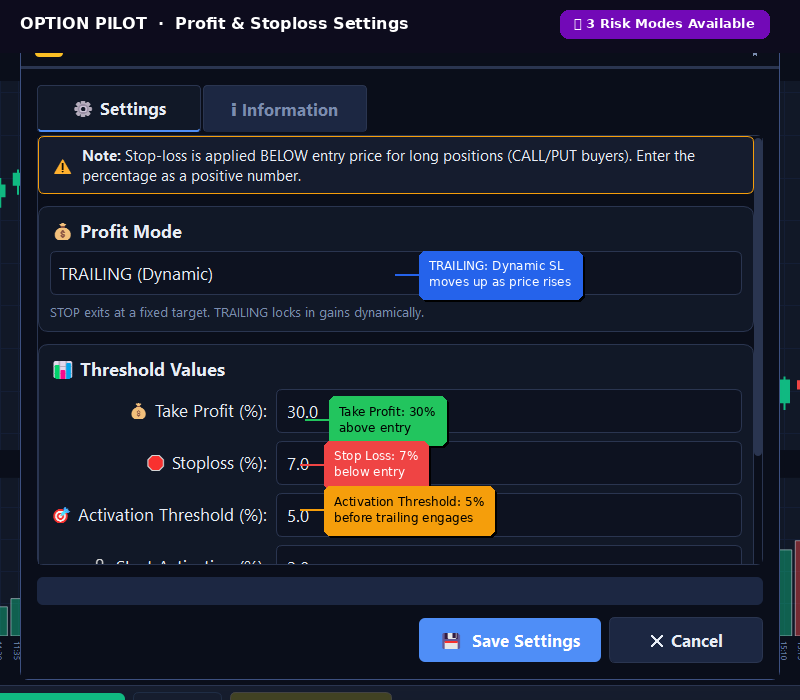
Profit & Stoploss Settings โ€” TRAILING mode ยท TP 30% ยท SL 7% ยท Activation 5%
Risk management settings showing TRAILING mode configuration
Strategy Backtester

Bar-by-Bar Replay.
Black-Scholes Pricing. 5 Analysis Tabs.

The backtesting engine replays 1-minute historical spot candles through the identical live signal logic โ€” using Black-Scholes with VIX cache for option premium estimation. Every result is what the live engine would have produced.

  • 5 analysis tabs: Overview, Trade Log, Strategy Analysis, Equity Curve, Candle Debug
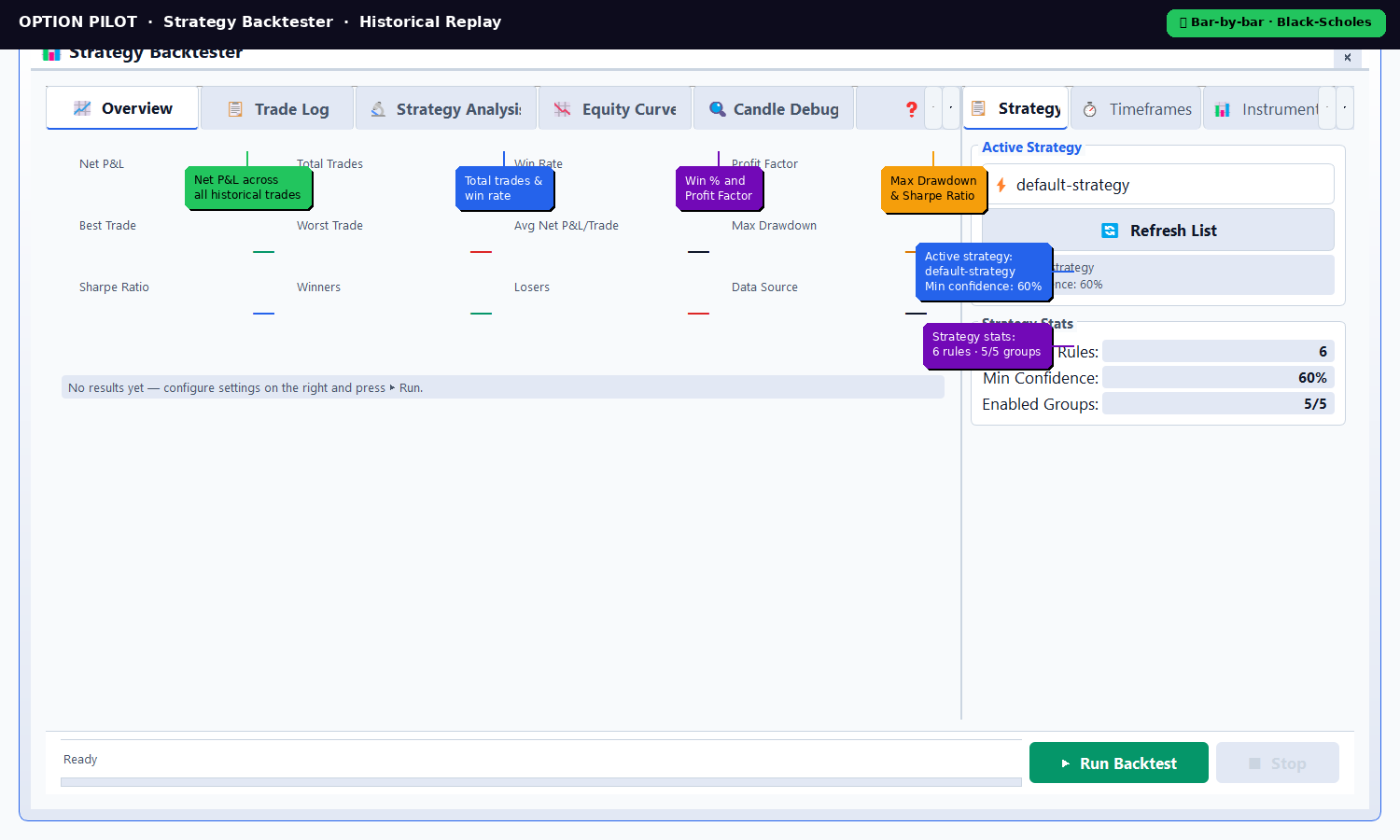
  • Performance metrics: Net P&L, Total Trades, Win Rate %, Best Trade, Worst Trade, Avg Net P&L/Trade, Max Drawdown, Profit Factor, Sharpe Ratio, Winners, Losers
  • Candle Debug tab: inspect exact indicator values and signal evaluation for every single historical bar
  • Indicator caching: keyed by (symbol, timeframe, df_fingerprint) โ€” same candle evaluated twice costs near-zero
  • Same risk engine: all three exit modes (STOP/TRAILING/FIXED), daily limits, max hold bars โ€” identical to live
  • Free forever โ€” no subscription needed for Paper Mode or Backtesting
Try Backtesting Free
Strategy Backtester โ€” Overview tab ยท default-strategy ยท 6 rules ยท 60% min confidence
Strategy Backtester showing metrics: Net P&L, Win Rate, Sharpe Ratio, Max Drawdown
Advanced Features

Multi-Timeframe Filter + 21 Built-In Popups

Every tool a systematic options trader needs โ€” built directly into the app.

๐Ÿ“

Multi-Timeframe Filter (MTF)

EMA(9) and EMA(21) crossover alignment checked across multiple timeframes simultaneously โ€” default 1m, 5m, 15m. Configurable agreement count (default 2 of 3 must agree). Derived from 1-minute base candles for consistency. Blocks weak signals from lower-timeframe noise.

๐Ÿง 

Signal Intelligence Console

Live debug window showing every signal group evaluation in real time: LHS indicator value, operator, RHS threshold, pass/fail result, weight, and per-group confidence score vs. threshold. Raw JSON view. Auto-refresh every 1 second. Invaluable for strategy tuning.

๐Ÿ“Š

TrendDetector Engine

Dedicated TrendDetector class evaluates strategy signals with full confidence-score handling and threshold filtering. Integrates with state_manager for live state updates. Provides debug output with AND-chain blocker analysis and high-confidence suppressed signal reporting.

๐Ÿ“‹

Trade History Viewer

Full order history from local SQLite database. Period filtering (today, week, month, custom). Shows entry time, fill price, exit price, exit reason (TP/SL/signal/kill), realised P&L, hold duration. CSV export with one click. Real-time updates via state_manager trade_closed signal.

๐Ÿ–ฅ

System Monitor

Real-time CPU usage, memory (used/available), disk stats via psutil. Trading tab shows active threads, order queue depth, WebSocket message rate. Network tab shows connectivity. Manual GC trigger. Refresh interval configurable. Tabs: System, Trading, Network.

๐Ÿ”—

Connection Monitor

Separate tracking for WebSocket connection (status, connected-since, messages received, reconnect count, errors) and Broker API (status, token expiry, last API call, rate limit). Market Data tab shows subscribed symbols. Reconnect WebSocket, Test Connection buttons.

๐Ÿ“ˆ

Stats Dashboard

Multi-tab statistics popup: session P&L breakdown, trade performance metrics, win/loss analysis, risk-adjusted returns. All data sourced from OrderCRUD and live TradeState. Periodic auto-refresh. Matches app theme (dark/light) via ThemeManager.

๐Ÿ“

Log Viewer

Filterable log popup showing all application events: INFO, WARNING, ERROR severity filters, module-level filtering, text search with Aa case-sensitivity toggle, max messages cap (default 20,000), word-wrap toggle. Clear, Pause, Copy All, Copy Filtered, Export, Stats buttons.

โšก

Modify SL / TP Mid-Trade

ModifySLDialog and ModifyTPDialog allow adjusting stop-loss and take-profit targets on an open position without closing it. ExitConfirmDialog provides a confirmation gate before any manual exit. All dialogs respect current theme and live TradeState.

Getting Started

From Install to First Paper Trade
in Under 10 Minutes

No server, no Python environment, no CLI. Just install, connect, and start.

๐Ÿ“ฅ
01

Install the App

Download the self-contained executable for Windows 10+, macOS 11+, or Ubuntu 20.04+. Run it โ€” no Python runtime, no dependencies to install separately. First launch opens the onboarding wizard.

๐Ÿ”‘
02

Connect Your Broker

Go to Settings โ†’ Brokerage Settings. Select your broker, enter App ID and Secret Key from your broker's developer portal. Click Open Login URL โ€” authenticate on your broker's OAuth page. Token stored locally. Takes under 3 minutes.

๐Ÿš€
03

Configure & Launch

Set exchange (NSE), derivative (NIFTY50/BANKNIFTY/FINNIFTY), lot size (auto-filled), candle interval, strategy rules, and risk limits. Switch mode to Paper. Click Start. The Dynamic Signal Engine begins evaluating every candle close.

Complete Feature Set

Every Feature. Available from Day One.

No feature tiers within a plan. Paper Mode and Backtesting are free forever. Live order execution requires Live Pro.

๐Ÿค–

Fully Automated Execution

Entry, position management, exit โ€” hands-free every session. Thread-safe OrderExecutor with per-order state machine. PositionMonitor watches open positions. All running in background thread pool.

๐Ÿ“Š

Dynamic Signal Engine v2.9

94 indicators across 6 categories via pandas_ta. Confidence-voting system with per-rule weights. 5 signal groups (BUY_CALL/PUT, EXIT_CALL/PUT, HOLD). Day-gap protection. Candle-close caching.

๐Ÿ”

Bar-by-Bar Backtesting

Historical 1m candle replay. Black-Scholes option pricing with VIX cache. Same signal engine as live. 5 tabs: Overview, Trade Log, Strategy Analysis, Equity Curve, Candle Debug.

๐Ÿ›ก๏ธ

3-Mode Risk Engine

STOP (fixed TP/SL), TRAILING (dynamic SL), FIXED (stepped) exit modes. Daily loss limit, max trades/day, daily target, max hold bars. Automated kill switch on breach.

๐Ÿ”„

Smart Re-Entry Guard

Per-exit-reason cooldown (SL/TP/signal). Direction control, fresh-signal requirement, price filter (blocks chasing), daily re-entry cap. All state persisted in SQLite across restarts.

๐Ÿ“

Multi-Timeframe Filter

EMA(9/21) alignment across 1m/5m/15m (configurable). Requires N of M timeframes to agree (default 2/3). Derived from 1-minute base โ€” no extra data subscriptions needed.

๐Ÿ”—

8 Broker Integrations

Official SDKs: Fyers (fyers_apiv3), Zerodha (kiteconnect), Dhan (dhanhq), Angel One (smartapi-python), Upstox (upstox-python-sdk), Shoonya (NorenRestApiPy), AliceBlue (pya3), Flattrade (NorenRestApiPy).

๐Ÿ””

Telegram Notifications

Non-blocking async Telegram alerts via single-thread executor. Separate enable/disable toggle. Alerts for: trade entry, exit, SL hit, TP hit, kill switch activation, token expiry, broker disconnect.

๐Ÿ”’

100% Local โ€” Zero Cloud

All data stored in local SQLite (SQLAlchemy 2.0). No cloud account, no remote server. Trade history, strategy config, broker tokens โ€” all on your device. Session runs even if our servers are down.

๐Ÿ“‹

Full Audit Trail

Every order, fill, rejection, signal evaluation, and session event logged to SQLite with IST timestamps. 5-year retention design. Viewable in Trade History popup with CSV export.

๐Ÿ’ป

Cross-Platform Desktop App

Native PyQt5 application. Windows 10+, macOS 11+ (Intel + Apple Silicon universal2), Ubuntu 20.04+. Self-contained executable โ€” no Python runtime needed on end-user machine.

โœ…

SEBI 2025 Compliant

Operates below 10 Orders Per Second โ€” Low-Frequency Tier. No exchange registration required for retail traders. Complete audit trail, automated kill switch, broker OAuth included.

Pricing

Start Free. Pay Only When
You're Confident.

Paper Mode and Backtesting are free forever. Subscribe to Live Pro only when you have a strategy you trust and are ready to trade real capital.

Free Trial
โ‚น0
7 days ยท No credit card
  • Full feature access โ€” all modes
  • 94 indicators in Strategy Editor
  • Signal Intelligence Console
  • All 8 broker connections
  • 7-day duration
  • No credit card required
Start Free Trial
Always Free
Paper Forever
โ‚น0
/ month ยท No expiry
  • Paper trading โ€” free forever
  • Full backtesting engine (5 tabs)
  • Strategy Editor v2 โ€” unlimited strategies
  • Signal Intelligence Console
  • All 8 broker connections
  • Live order execution not included
Start Free Trial
Recommended Path

Free Trial (7 days) โ†’ Practice in Paper Mode โ†’ Run strategy through Backtester โ†’ Continue Paper & Backtest free forever โ†’ Subscribe to Live Pro only when your backtest results give you confidence.

โœ… SEBI 2025 Retail Algo Trading Framework โ€” Low-Frequency Tier Compliant

Designed for Retail Traders โ€” Not HFT Firms

Option Pilot operates well below the 10 Orders Per Second threshold in SEBI's 2025 retail algo circular โ€” placing it in the Low-Frequency tier where users do not require exchange registration as an algo provider. Included by design: complete SQLite audit trail, automated kill switch, broker OAuth2 authentication, and configurable per-session risk controls.

FAQ

Frequently Asked Questions

Does Option Pilot support 50+ indicators?
+
Yes โ€” the Strategy Editor connects to pandas_ta and gives you access to 94 indicators across 6 categories: 15 Momentum (RSI, MACD, Stoch, CCI, TSI, WillRโ€ฆ), 26 Trend (EMA, SMA, ADX, Supertrend, PSAR, Aroonโ€ฆ), 8 Volatility (BBands, ATR, Keltner Channelโ€ฆ), 14 Volume (OBV, CMF, MFI, KVOโ€ฆ), 10 Statistic (ZScore, Entropy, Kurtosisโ€ฆ), and 21 Others (Fisher, Squeeze, LinReg, PPOโ€ฆ).
What is the confidence voting system?
+
Every rule in a signal group carries a numeric weight (e.g. MACD histogram rule: weight=1.5, RSI rule: weight=1.0). When a candle closes, the engine evaluates all rules and computes Confidence = ฮฃ(weights of passing rules) / ฮฃ(all rule weights). If confidence โ‰ฅ min_confidence threshold (default 60%), that signal group fires. This prevents weak or single-indicator signals from triggering trades.
How does Trailing Stop-Loss work exactly?
+
In TRAILING mode: (1) After entry, the SL remains fixed at the configured SL% below entry. (2) When the option price rises above entry by Activation Threshold % (default 10%), the trailing mechanism activates โ€” SL jumps to SL-at-Activation % above entry (default 5%). (3) From that point, the SL follows the highest price seen, always staying X% below the peak. The SL never moves downward once activated.
What is the Re-Entry Guard?
+
After a position closes, the Re-Entry Guard prevents the engine from immediately opening another position in the same direction. Settings: cooldown candles after SL exit (default 3), TP exit (default 1), signal exit (default 2). Also: direction control (block same direction only), require a fresh signal (not just the old one still active), price filter (blocks re-entry if current price is worse than entry by more than 5% โ€” avoids chasing), daily re-entry cap. All settings persist across app restarts via SQLite.
What is the Multi-Timeframe Filter?
+
An optional signal filter that checks EMA(9) and EMA(21) crossover alignment across multiple timeframes (default: 1m, 5m, 15m). The signal from the main strategy only fires if at least N timeframes agree on direction (default: 2 out of 3). Higher-timeframe data is derived from the 1-minute OHLCV data already loaded โ€” no extra broker API calls needed.
Is my broker password stored anywhere?
+
Never. You authenticate directly on your broker's OAuth page in your browser. Option Pilot stores only the access token your broker issues after login. Tokens are stored locally on your device in encrypted SQLite โ€” never transmitted to our servers. The TokenExpiryHandler tracks expiry and prompts you to re-authenticate daily (takes under 30 seconds).
What happens if my internet drops mid-trade?
+
The WebSocketManager attempts reconnection automatically. Your open position remains at your broker. The broker's own systems will manage the position. This is why configuring a Stop Loss is critical โ€” it gives your broker a server-side exit instruction that executes even without the app running.
Is Paper Mode really free forever?
+
Yes, unconditionally. After the 7-day trial ends, Paper Mode and Backtesting remain available with no subscription required, no time limit, and no feature restrictions. The full 94-indicator Strategy Editor, Signal Intelligence Console, and all 5 backtest tabs are included. Only live order execution requires a Live Pro subscription.

Risk Disclaimer: Trading in equity derivatives carries significant financial risk including total loss of capital. Past backtest performance does not guarantee future live results. Option Pilot is a software execution tool โ€” not financial advice or a guaranteed profit system. Always trade within your means, configure appropriate risk controls, and validate your strategy extensively in Paper Mode before going live.

Start Today โ€” It's Free

Stop Missing Trades.
Let the Signal Engine Work For You.

7-day full-access trial. No credit card. Begin in Paper Mode, run your strategy through the backtester, and go live only when you're confident. Paper and Backtest remain free forever either way.